
Git and GitHub: Where next?
Last updated on 2026-01-20 | Edit this page
Overview
Questions
- I can create a git repository and push it to GitHub, what next?
- What other things can I do with GitHub.
- Where can I get more help and information?
Objectives
- Highlight some of the other features of git and GitHub.
- Provide some pointers of where to look for further information.
Git and GitHub - where next?
Git and GitHub are very feature-rich tools and there’s far more to learn than the very basic usage we’ve covered in this short session. Indeed it’s possible to use these tools extensively in real-world projects and still be learning new things regularly!
In the next section of this episode, Further training opportunities and resources, there are some links to potentially helpful resources that you might like to follow-up on
Git:
-
Branches: Branches provide a way to work on changes to your repository content on a separate “track” to the main repository content. Branching can be straightforward but it can also lead you towards needing to understand a wide range of complexities in git. Often these are best learnt through experience.
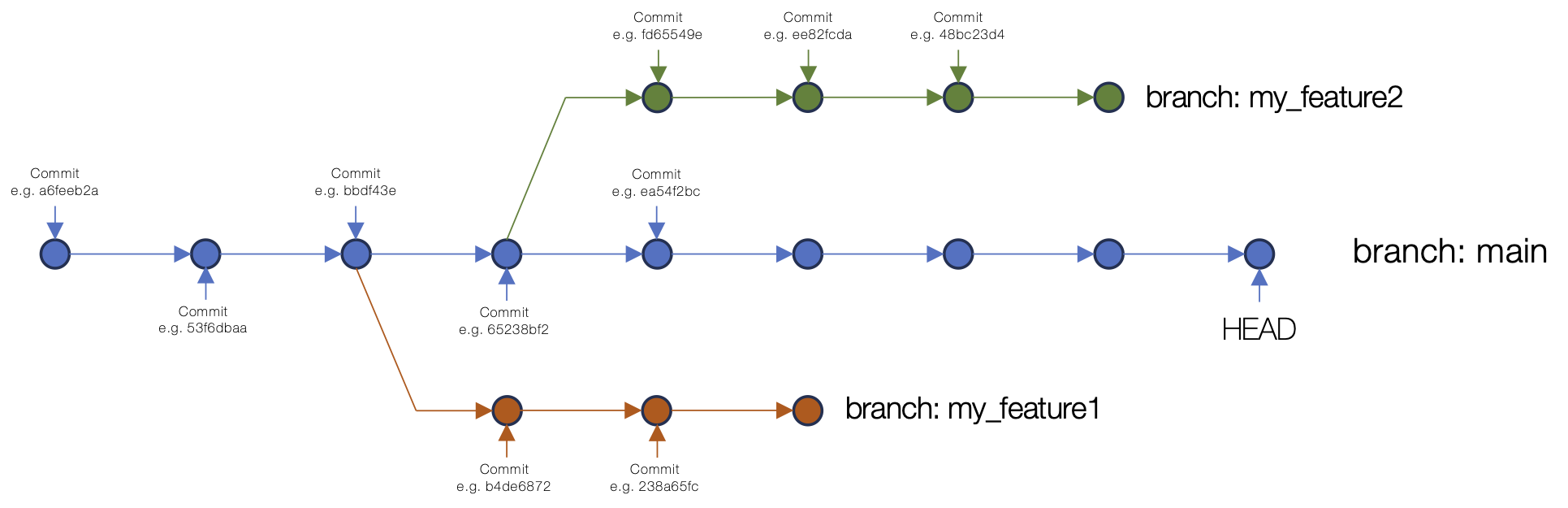 An example of branching in a Git repository commit structure.
 -
Merging: Consider a case where you’re working on the content in your repository in a branch. You want to add some new content to the repository and make changes to existing content and you’d like a bit of time to work on these changes without affecting the main content. Once you’ve completed your updates, you want to bring this updated content onto the main branch of the repository. This is where you’d undertake a merge.
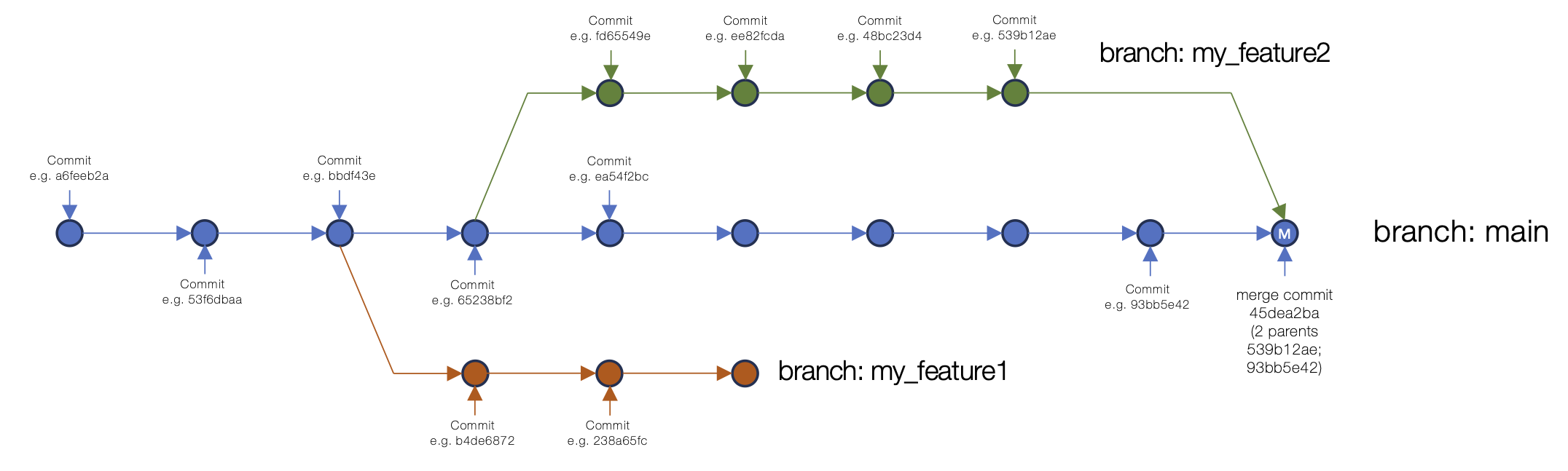 An example of merging a branch into main in a Git repository commit structure.
 Conflicts: Git conflicts occur when you attempt to push a change to a remote repository (i.e. pushing from your local git repository to GitHub) and another change, that you don’t have locally, has been made to the same piece of content on the remote repository. For example, you change the temperature parameter in your 3D printer configuration file, but your colleague has just changed it themselves and pushed that change to the remote repository. When you push to the remote repository, git detects that there’s a conflict. There are a number of common workflows and approaches to avoiding and resolving conflicts. Take a look at the Carpentries git material on conflicts for a nice introductory overview.
Collaborative material development: Git was made for supporting collaborative development. Indeed, it was developed to support the development of the Linux kernel, a huge collaborative community software development project! As with managing conflicts, there are different workflows and best practices followed for using git to manage working collaboratively on code or other text-based content. There’s lots of material online about collaborative code or content development with git.
GitHub:
GitHub adds a number of features on top of git that provide excellent support for collaboration and working with teams (or with unknown contributors) to support the creation and maintenance of code, documentation or other materials. Some of these features are summarised below. See the GitHub documentation for more details. You can also find many tutorials or videos online about how to make best use of these features.
Issues: Issues in GitHub provide a way to highlight and discuss problems, enhancements or requirements as well as supporting other repository content-related discussion. Issues are specific to a given repository and are also often used for managing development, opening issues for functionality to be added or updates that need to be made.
Pull requests: Pull requests sit at the heart of GitHub’s support for collaborative material development. When you create a GitHub repository, even if it’s publicly visible, it will not allow anyone other than you to commit to the repository. You can choose to add collaborators to your repository and give them permission to commit. However, in order to protect the main version of the content (generally in the
mainbranch), rules will often be in place to prevent committing directly to the main branch. Instead, contributors will be expected to make their contributions in a branch and then open a request for their changes to be merged into the main branch. They will open a pull request for this. In a collaborative project, someone would then generally be expected to review the proposed contibution(s) and potentially enter a discussion with the contributor about any suggested/required modifications or changes to their contribution, before ultimately accepting this into the main content.Forks: A fork is used in an extension of the above scenario. If a repository on GitHub is public (or it’s private but someone is given read-only access), and that individual wants to contribute to the repository content, they can’t create a branch in the main repository from which to open a pull request. Instead they create a “fork” of the repository, a copy of the git repository within GitHub, under their own user account, or an organisation that are part of. They then have full read and write access to this fork of the repository. They can make changes within their fork and then open a pull request, as explained above, requesting to contribute content into the main project repository. An owner/maintainer of that repository can then choose to accept the conrtibution into the main repository once any requested changes have been made.
GitHub actions: If you’re using GitHub for developing software, GitHub Actions provides an advanced environment for running a number of automated tasks on the code in your repository. Actions is now very advanced and offers a huge range of capabilities, including via third-party “actions”. Especially common uses of GitHub Actions are for running automated tests on code and for packaging and releasing code to package repositories. Actions can run processes on a range of different operating systems and OS versions meaning that, for example, a set of automated code tests can be run across a range of different operating systems (e.g. Windows, Linux and macOS), each time so specific trigger occurs. This trigger might be the pushing of new content to a repository from a remote repository, or the creation of a pull request or a release within GitHub. This can be used to ensure that each time code is changed, it still functions as expected across a number of different platforms.
Projects: GitHub now includes extensive functionality for project management tasks via GitHub Projects. A range of different views of project tasks can be provided and these can be linked to repository issues to offer a direct connection to discussion and code or other content added to a repository to address specific task items.
Wiki: Repositories can have a wiki (if this option is enabled) which provides a space for editable information pages that sit alongside the repository. There are range of different use cases for GitHub wikis. The inclusion of this functionality avoids having to work with a separate external wiki platform if one is required.
GitHub Pages: GitHub Pages provides free web hosting for static web content developed within GitHub repositories. The basic Pages infrastructure is based on the Jekyll static site generator which can be used to support the display of Markdown-based content in a templated stated web page environment. Pages also offers support for hosting static web content generated through other means by using GitHub Actions to build the pages and placing the generated content in repository location (e.g. a separate branch) from where Pages hosts the content.
Further training opportunities and resources
There are various resources available from documentation to training courses (both taught and self-paced) that can help you to develop your git and GitHub knowledge. Here are few options:
Online documentation, info and other materials:
Git introductory videos: A great way to get a slightly different (and more detailed) perspective on the background of git, what version control is and how it can help you.
The git book (Pro Git): Available online under a Creative Commons Attribution Non Commercial Share Alike licence. A detailed reference to git from the basics through to much more advanced topics, and some content on using GitHub.
GitHub Docs: GitHub’s detailed documentation website.
GitHub Blog: Regular articles covering GitHub, platform features and related software development topics.
Training courses:
Version Control with Git course (Software Carpentry): This is The Carpentries introductory git course covering the basics of Git and GitHub in 3+ hours of material. This can be covered as a self-learning course or through attending a taught Software Carpentry course which also includes an introduction to the bash shell and a programming language (either Python or R).
CodeRefinery’s introduction to version control course: This is taught as a 2-day course but material can also be easily worked through online.
CodeRefinery’s Collaborative distributed version control course: This course adds another day of more advanced material on top of the introductory course mentioned above.
Software Development Using Git and GitHub: An episode of the Intermediate Research Software Development course within the Carpentries Incubator.